
Material Management
In this screen, we manage the materials.
This section is divided into 3 parts:
- the selection of delivery notes to be taken in charge,
- the number of materials filled in compared to the total materials of the delivery notes taken in charge,
- the table containing all the materials related to the delivery notes taken in charge.
To start filling in, simply select the delivery note you intend to take in charge
and begin filling in the related materials.
To fill in a material, just click on the blue pencil and the single row becomes editable.
On each row we have different pieces of information:
- The related delivery note number
- The material code
- The material description
- The availability, meaning the number of pieces already filled in compared to the total to be filled in
- The quantity used
- The quantity not used
- The non-compliant quantity
- The defective quantity
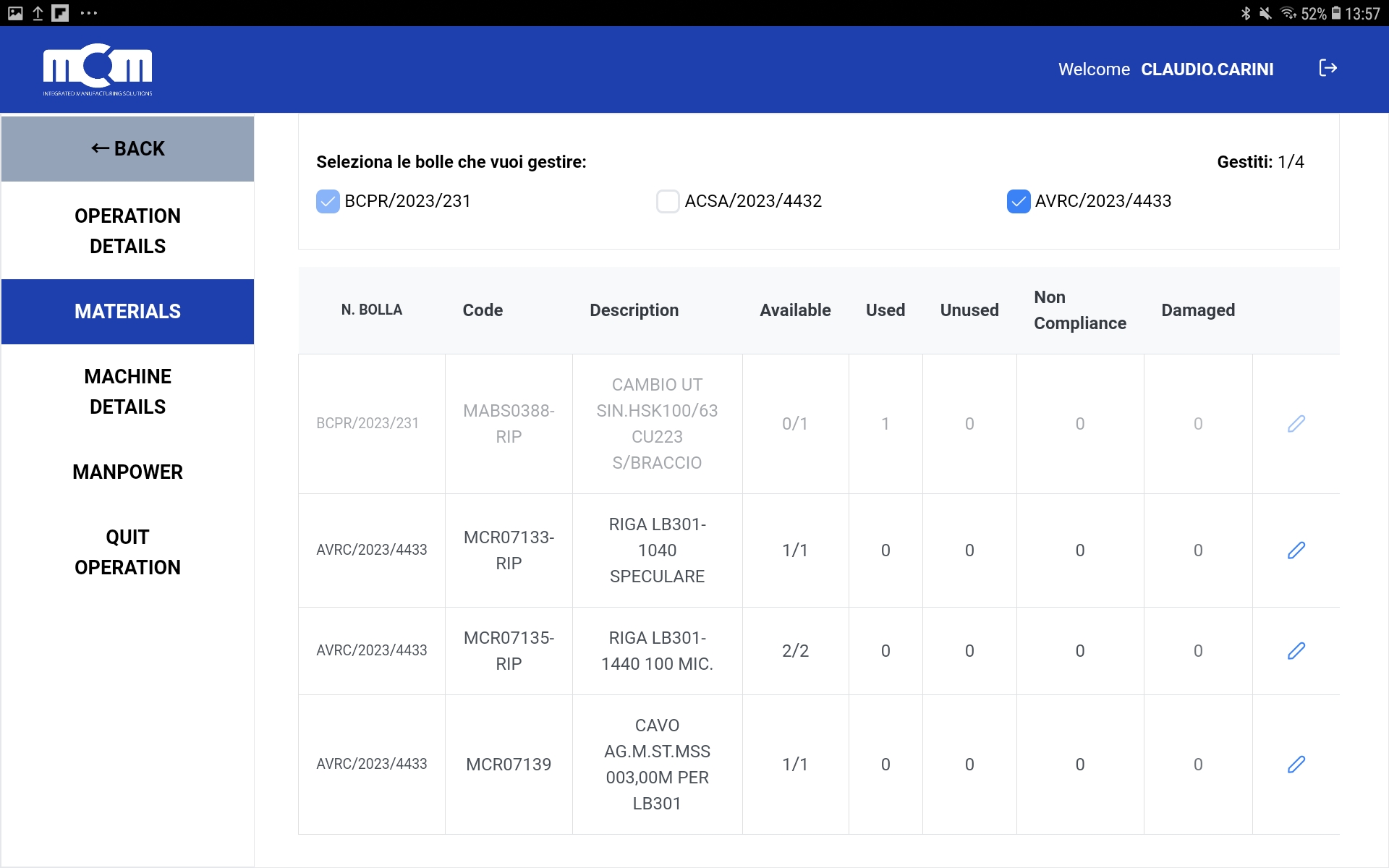
As we can see from the example screen, those material rows that have already been fully filled in appear blurred,
while those still to be filled in remain clearly visible.
Note:
Once a delivery note has been taken in charge, the intervention cannot be closed until all the related materials have been filled in.